
Cloud Phone for WhatsApp Business: Managing Multiple Numbers at Scale
Manage multiple WhatsApp Business numbers at scale with a cloud phone setup, real SIM control, and proper number-to-device separation.
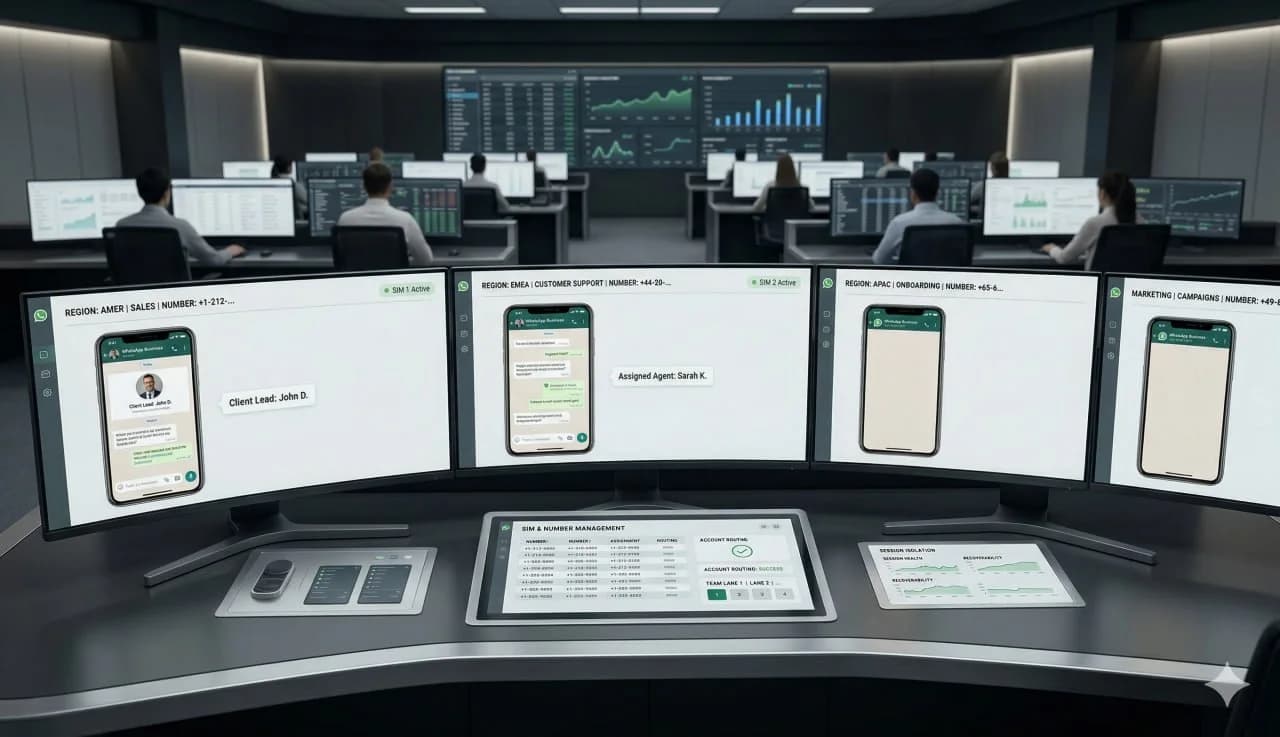
Cloud Phone for WhatsApp Business: Managing Multiple Numbers at Scale
Key takeaway: If you want to scale WhatsApp Business across many numbers, the safest and most operationally stable model is one number per dedicated device environment, backed by real SIM ownership and clear separation between accounts, sessions, and operators.
Managing a few WhatsApp Business numbers manually is easy. Managing dozens across sales teams, support flows, regional campaigns, or client operations is not. At scale, the challenge is no longer just logging in. It is keeping each number stable, recoverable, and operational without mixing identities or creating avoidable failure points.
For teams evaluating mobile infrastructure, the real question is not whether a cloud phone is convenient. It is whether the setup preserves account integrity, SIM continuity, and clean separation between numbers and devices.
Direct decision: what matters for WhatsApp Business at scale?
WhatsApp Business accounts are sensitive to number continuity, recovery timing, media handling and device history. The tool choice should start from those signals, not from a generic “multi-account” checklist.
A browser profile can help when the workload is web-heavy. An emulator can help with disposable tests. A local phone farm can help when the team wants full physical ownership. iRemotech fits when the workload needs real mobile devices, remote operators, stable sessions and less hardware burden.
What WhatsApp Business requires at scale
WhatsApp Business is tied to phone-number identity much more directly than many other mobile workflows. That changes the infrastructure requirements.
When you manage multiple numbers at scale, you need:
- a stable device environment for each number
- reliable access for team members without constant handoffs
- a recovery path if a device session is lost
- consistent number ownership through real SIM control
- operational separation so one issue does not spread across the whole setup
This is why broad multi-account advice often misses the point for WhatsApp Business. The biggest risk is not just efficiency loss. It is breaking the link between the number, the device environment, and the recovery process.
In WhatsApp Business operations, a number is not just a login credential. It is part of an identity chain that includes SIM access, device state, verification history, and recovery ability.
Why number/device separation matters
Number/device separation means each WhatsApp Business number should have its own dedicated environment instead of being rotated loosely across shared phones, inconsistent virtual instances, or unmanaged access patterns.
That separation matters for four reasons.
1. Session stability
When multiple numbers are handled through improvised device sharing, session conflicts become more common. Logouts, re-verifications, and operator confusion grow quickly once more people join the workflow.
2. Recovery and verification
If a number needs to be reverified, real SIM control becomes critical. Without dependable access to the original SIM, recovery becomes slower, riskier, and sometimes impossible within the needed time window.
3. Team accountability
A dedicated environment per number makes it easier to define ownership, permissions, audit trails, and process discipline. This matters for agencies, sales teams, and support organizations.
4. Risk containment
The fastest way to create instability is to treat multiple WhatsApp Business numbers as interchangeable sessions that can move freely between unmanaged devices, temporary instances, or weak SIM handling.
Why real SIM control is still essential
For WhatsApp Business, real SIM ownership is not optional infrastructure. It is part of the operating model.
A real SIM matters because it supports:
- initial verification
- re-verification after session loss
- recovery after device changes
- continuity when operators change
- cleaner control over who owns the number operationally
Some teams focus only on remote access and forget the telecom layer underneath. That is where many scaling problems begin. If the SIM is not clearly assigned, available, and recoverable, the rest of the setup becomes fragile.
This is also where teams should distinguish between convenience and resilience. A setup may feel fast in the first week, but if it cannot support stable number ownership over time, it will break under real business use.
Recommended setup for multiple WhatsApp Business numbers
For most teams, the best structure is simple:
One number, one dedicated device environment
Real SIM ownership and documented recovery
Each number should be tied to a real SIM with documented ownership, storage, and access procedures. If re-verification is needed, the team must know exactly how that number is recovered.
Shared remote access without shared identity
Operators may need access to the same workflow, but they should not create device chaos. The infrastructure should allow controlled access while keeping the device environment stable.
Standardized naming and routing
At scale, teams need an internal map:
- number
- purpose
- market or client
- assigned operators
- SIM owner
- device environment
- recovery status
Without that structure, scaling becomes guesswork.
Cloud phone vs weak multi-number setups
| Factor | Dedicated cloud phone workflow | Shared device or improvised setup |
|---|---|---|
| Number stability | Higher, with persistent environments | Lower, often disrupted by handoffs |
| SIM recovery readiness | Clear if real SIM ownership is documented | Often unclear or delayed |
| Team access | Controlled and repeatable | Messy and dependent on who has the phone |
| Risk isolation | One issue can stay contained | Problems can spread across numbers |
| Operational visibility | Easier to assign and track | Harder to audit |
| Scalability | Better for structured teams | Breaks earlier as volume grows |
When a cloud phone setup works best
A cloud phone approach is a strong fit when you need to manage:
- regional WhatsApp Business numbers for multiple markets
- separate numbers for sales, support, and onboarding
- agency-managed client numbers
- high-volume operations where several team members need controlled access
- workflows that require persistent availability without moving physical phones around
It becomes even more useful when paired with a clear real-device policy and disciplined SIM management.
When you may need more than a generic cloud phone
Not every cloud phone model is equal. If the setup relies on weak virtualization, unclear SIM processes, or disposable device logic, it may not be suitable for WhatsApp Business operations that depend on long-term number continuity.
For this use case, the goal is not just remote access. The goal is persistent, recoverable, business-grade mobile infrastructure.
For WhatsApp Business at scale, treat every number as a managed asset with its own device environment, SIM ownership record, operator process, and recovery path.
What to choose if number continuity matters most
If you are managing multiple WhatsApp Business numbers, do not optimize only for convenience. Optimize for continuity.
The safest approach is to keep each number tied to its own stable device environment, backed by real SIM control and clean number/device separation. That reduces operational friction, improves recovery, and makes team-based workflows more reliable as volume grows.
Frequently asked questions
What is the biggest mistake in multi-account work?
The biggest mistake is treating accounts as isolated logins instead of operating environments. Platforms look at the device, network, app behavior, recovery patterns and how accounts cluster over time.
Do proxies solve the problem by themselves?
No. Proxies help with network separation, but they do not fix weak device identity, emulator signals, erratic operator behavior or poor account warm-up.
When should a team use one device per account?
Use one device per account when the account has real value, needs long-term continuity or operates in a platform where device trust is part of the risk model.
How should new accounts be warmed up?
Warm them gradually. Keep the device and network stable, avoid aggressive first-day actions, and make the account behavior look like a real operator is building a routine.
Stop juggling physical devices.
iRemotech gives you real iPhones in the cloud — ready for multi-account operations, automation, and scale. Create your account in minutes.
Sign up freeMiguel Nogales
Founder @ iRemotech
From Spain, living in Andorra. Tech enthusiast passionate about infrastructure, remote technology, and building innovative solutions.