
How to Build an iPhone Farm: Hardware, Software, and Operations
Learn how to build an iPhone farm with the right hardware, control software, SIM strategy, network design, and operations discipline.
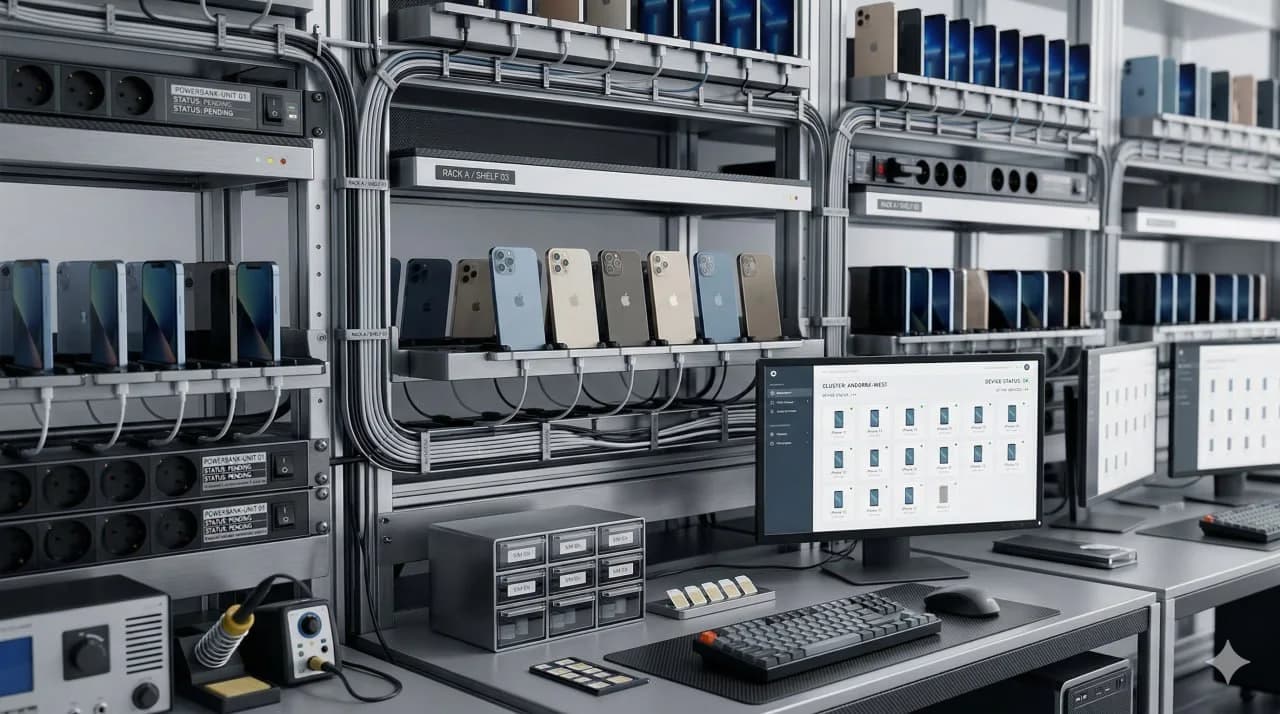
How to Build an iPhone Farm: Hardware, Software, and Operations
Short answer: You can build an iPhone farm yourself, but the project is much more than buying used iPhones and plugging them into USB hubs. A real iPhone farm requires hardware planning, network design, SIM strategy, control software, monitoring, recovery processes, and day-to-day operations discipline. DIY can work, but most teams underestimate the operational burden.
Key takeaway: Building an iPhone farm is not mainly a hardware purchase. It is the creation of a small mobile infrastructure business inside your business. The cost is not just devices. The cost is the full stack required to keep those devices stable, distinct, and usable every day.
The phrase iPhone farm still has low competition in search, which is notable because many teams are looking for direct answers and finding very little. But the lack of search competition also creates confusion. Some people imagine a desk full of phones. Others imagine a remote device cloud. Both are related, but they are not the same deployment model.
This guide explains how to build a DIY iPhone farm, what components you actually need, where teams usually make mistakes, why many operators eventually move from local builds to managed infrastructure, and how that architecture choice compares with cloud-phone delivery.
The phone farm guide documents how device fleets are built and operated at scale.
Box Phone Farm vs Remote iPhone Farm covers the local-versus-remote comparison in more detail.
Best Cloud Phones for Social Media in 2026 surveys the managed remote-device category.
iRemotech pricing documents the managed-service pricing range and plan scope.
How to Manage Multiple Instagram Accounts Professionally documents the Instagram-specific operator workflow.
What an iPhone farm actually is
An iPhone farm is a fleet of physical iPhones organized to run separate mobile sessions at scale.
That fleet can be used for:
- multi-account social media operations,
- app testing,
- marketplace workflows,
- mobile automation,
- QA environments,
- remote device access for teams, or
- any workflow where each account or task needs its own real iPhone.
The defining characteristic is not the number of devices. It is that each workflow runs on real iPhone hardware instead of a simulated iOS environment.
This is why an iPhone farm belongs in the same strategic discussion as real devices vs emulators . There is no meaningful iOS emulator setup that fully replaces real iPhones for serious production work.
The first choice: local build or managed remote model
Before buying anything, make the architecture choice.
Option 1: Local DIY iPhone farm
You own the devices, power, control hardware, network setup, and recovery process.
Good for:
- operators who want direct physical control,
- teams with infra experience,
- stable local access,
- custom experimental builds, and
- teams that want to own the asset base.
Tradeoff: You also own the maintenance burden.
Option 2: Managed remote iPhone infrastructure
You access real iPhones remotely while the provider handles much of the physical infrastructure, uptime work, and operational plumbing.
Good for:
- agencies,
- distributed teams,
- teams that want speed,
- teams that do not want a local rack operation, and
- operators who care more about uptime than hardware ownership.
Tradeoff: Higher recurring spend per device, but lower infrastructure burden.
This is the first architecture choice. If the architecture is mismatched here, the rest of the project becomes more expensive than expected.
The minimum hardware you need
A serious iPhone farm needs more than phones.
1. The iPhones themselves
This is obvious, but the real requirement is standardization.
You need to define:
- model range,
- iOS version policy,
- battery-health threshold,
- storage tier,
- Wi‑Fi vs cellular role,
- whether each device gets its own SIM, and
- whether the fleet will be mixed or standardized.
A standardized fleet is easier to operate. Mixed generations create more edge cases in cables, power, battery behavior, and OS compatibility.
2. Power and charging infrastructure
Many first-time builders underestimate power stability.
You need:
- reliable power strips,
- sufficient charging capacity,
- clean cable management,
- safe heat spacing,
- protection against power interruptions, and
- a clear policy for battery management.
A bad power layout creates cascading failures: drained devices, unstable USB communication, overheating, or devices dropping out of the control layer.
3. USB hubs, adapters, and cable management
If you are controlling many iPhones locally, the cable layer becomes part of your infrastructure.
You need:
- quality hubs,
- consistent cabling,
- spare adapters,
- labeling,
- physical mapping of each port to each device, and
- a process for replacing failing cables quickly.
Cheap cables create expensive debugging.
4. Racks, shelves, or box layout
The physical layout must make devices:
- reachable,
- visible when needed,
- ventilated,
- easy to relabel,
- easy to replace, and
- safe to work on without disconnecting half the fleet.
There is no single correct format. Some operators prefer shelves. Some use dense box-style mounting. Some create modular racks. The important thing is serviceability and a clear maintenance model.
box phone farm vs remote iPhone farm details the local-versus-remote tradeoff.
The network layer most teams get wrong
A device farm is not just hardware. It is identity infrastructure.
Wi‑Fi alone is rarely enough
If many devices share one local network identity, the hardware may be separate but the trust model may still be weak for sensitive use cases.
That is why operators also think about:
- unique SIMs,
- mobile data paths,
- proxy policy,
- geographic consistency,
- network segregation,
- device-to-IP mapping, and
- recovery when a connection degrades.
Why SIM strategy matters
For social media and other trust-sensitive operations, SIM-backed identity changes the quality of the environment.
A serious setup needs clear answers to these questions:
- Does each device have its own SIM?
- Is the carrier mix intentional?
- How are SIMs documented and replaced?
- What happens when a SIM fails or is blocked?
- Are devices expected to present genuine carrier context all the time?
This is one of the strongest differences between DIY setups and managed systems built around dedicated SIM-backed devices.
Proxies are not a magic fix
Proxies can help carry traffic, but they do not transform a weak device environment into a strong one.
That is why network design has to fit the use case:
- residential or mobile proxy policies,
- one-to-one mapping where needed,
- no accidental IP sharing across sensitive accounts,
- stable region logic, and
- no contradiction between device, locale, and network story.
Phone Farm vs Cloud Phone explains how the network and operating-cost tradeoffs change between the two models.
Device Fingerprinting on Mobile explains the platform checks and account-safety signals behind those constraints.
Cloud Phone vs Antidetect Browser frames the browser-versus-device architecture split, while GeeLark Alternative documents the narrower Android-vendor comparison.
iRemotech pricing documents the managed-service scope in the same infrastructure context.
Software: what actually controls an iPhone farm
The software stack is where many DIY builds become fragile.
At minimum, you need a plan for:
- remote screen access,
- app installation and updates,
- device status visibility,
- automation,
- failure recovery,
- logging,
- operator permissions, and
- fleet management.
Common software layers in DIY builds
Device management tools
Teams often use device utilities for:
- backups,
- app deployment,
- configuration,
- file management,
- resets, and
- status checks.
These tools are useful, but they are not a full farm operating system.
Automation layer
Some teams rely on:
- manual operation,
- macros,
- Appium,
- custom scripts,
- template-based RPA, or
- computer-vision-based control.
Each approach has tradeoffs. Template-based systems are often brittle. Coordinate-based logic breaks when layouts shift. Vision-based control is more resilient for real mobile UI work.
Monitoring and alerting
If a device freezes, disconnects, drains, loses network, or crashes, someone needs to know.
That means you need:
- health checks,
- uptime visibility,
- failure notifications,
- operator escalation,
- device inventory records, and
- incident history.
Without monitoring, a device farm becomes a silent-failure machine.
Operations: the part buyers underestimate most
This is where the “just buy 20 iPhones” mindset fails.
Inventory and labeling
Every device needs an identity in your own system:
- device label,
- model,
- OS version,
- SIM mapping,
- account assignment,
- power port,
- control path,
- replacement history, and
- status notes.
If you cannot answer “Which physical phone is this account using right now?” in seconds, the farm will become chaotic as it grows.
Battery and hardware aging
Real devices degrade.
Over time you will see:
- worse battery health,
- port wear,
- screen issues,
- cable instability,
- heat problems,
- random shutdowns, and
- devices that become unreliable even if they still technically boot.
That means you need a replacement policy, not just a purchase policy.
OS drift and app drift
Apps change. iOS changes. Permissions change. UI flows change.
Any automation or operating workflow built on assumptions will eventually break.
That is why iPhone-farm operations require:
- controlled update policies,
- test devices before fleet-wide changes,
- rollback thinking,
- documented runbooks, and
- periodic audit of the full stack.
Human operations burden
Someone has to:
- recover failed devices,
- replace dead cables,
- manage SIM inventory,
- update apps,
- track bans or account issues,
- reassign devices,
- investigate incidents, and
- keep the fleet organized.
At 5 devices, this is manageable. At 25 devices, it becomes a routine. At 100 devices, it becomes an operational function.
iPhone farm build comparison table
For the broader operating model, keep the phone farm guide as the baseline before choosing hardware and control software.
For DIY farm builds, the iMouse alternative for iPhone farms compares local control, maintenance load and remote access before hardware spend.
| Layer | What you need | Why it matters | Common DIY mistake |
|---|---|---|---|
| Devices | Standardized fleet of real iPhones | Gives each workflow real iOS hardware | Buying random mixed devices with no policy |
| Power | Reliable charging and distribution | Keeps devices stable and reachable | Underpowered hubs and messy charging |
| Cabling | Quality hubs, adapters, labels, and spares | Reduces disconnects and debugging time | Treating cables as disposable details |
| Layout | Serviceable rack, shelf, or box design | Makes replacement and maintenance possible | Overpacking devices with poor airflow |
| Network | SIM strategy, IP discipline, and region consistency | Determines identity quality and stability | Assuming one Wi‑Fi network solves everything |
| Software | Remote control, deployment, automation, and monitoring | Turns phones into an operable fleet | Using point tools with no unified process |
| Inventory | Mapping devices, SIMs, accounts, and incidents | Keeps operations coherent at scale | No system of record |
| Recovery | Procedures for crashes, dead devices, and swaps | Preserves uptime | Debugging ad hoc every time |
| Staffing | Time and people to run the stack | Determines real cost of ownership | Ignoring labor in the budget |
Where DIY appears workable
A DIY iPhone farm tends to appear workable when:
- direct ownership is part of the operating model,
- you have technical operators already,
- the fleet is small to medium,
- local access is easy,
- the use case requires custom handling, or
- you explicitly want to build infrastructure competence in-house.
DIY is not irrational. It is just usually under-scoped.
Where managed remote infrastructure enters the comparison
Managed remote infrastructure usually enters the comparison when:
- the team is distributed,
- uptime matters more than ownership,
- the local build is becoming messy,
- the business does not want to staff a device operation,
- faster scale-up is part of the requirement set,
- dedicated SIM-backed real devices are required, or
- the cost of downtime is higher than the subscription premium.
This is why many teams start with a local experiment and then migrate. They do not leave DIY because real devices stopped mattering. They leave DIY because the operating burden became the main cost.
the browser-vs-device infrastructure comparison explains the browser-first versus real-device architecture split. Best Antidetect Tools for Social Media in 2026 documents the browser category on its own terms. real devices vs emulators at iPhone scale covers the execution-model split, and GeeLark alternative to Android cloud phones remains the relevant Android-vendor reference when that comparison is still in scope.
The workload-specific references below keep each operating model documented in its own lane and avoid collapsing local, remote, and browser-first infrastructure into one category scan.
Verdict
To build an iPhone farm, you need hardware, network design, control software, monitoring, and operations discipline. The phones are only the visible part.
A DIY build and a managed remote setup document different operating models: one centers on self-operated hardware, the other on externally managed real-device access.
What to compare before building versus renting
Frequently asked questions
What should phone farm software control?
It should control access, device state, recovery, operator permissions and automation. A screen-sharing layer alone is not enough once the fleet becomes operational infrastructure.
Is automation the main feature?
Automation matters, but reliability matters more. The system has to survive app updates, failed sessions, device issues and operator handoffs without constant manual repair.
When does software become the bottleneck?
It becomes the bottleneck when adding devices also adds manual checks, manual recovery and coordination overhead. Good software keeps the operating model stable as the fleet grows.
Should teams build their own control layer?
Only if they have enough scale and engineering capacity to maintain it. For most teams, managed infrastructure is cheaper than building and supporting a fragile internal stack.
Stop juggling physical devices.
iRemotech gives you real iPhones in the cloud — ready for multi-account operations, automation, and scale. Create your account in minutes.
Sign up freeMiguel Nogales
Founder @ iRemotech
From Spain, living in Andorra. Tech enthusiast passionate about infrastructure, remote technology, and building innovative solutions.