
Device Fingerprinting on Mobile: What Platforms Actually Check
Mobile platforms do not rely on one signal. They score a device using a stack of checks: hardware identity, OS consistency, carrier data, network quality, sensors, app behavior, and cross-account correlation. The more sy
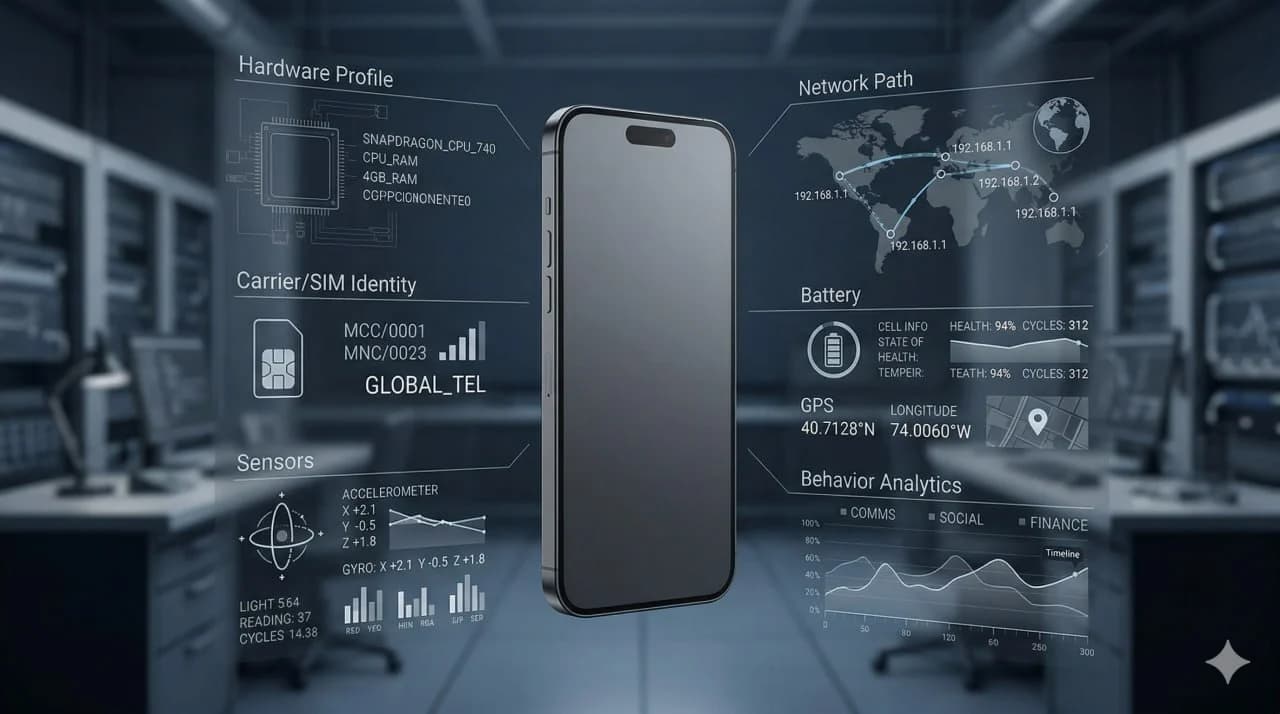
Short answer: Mobile platforms do not rely on one signal. They score a device using a stack of checks: hardware identity, OS consistency, carrier data, network quality, sensors, app behavior, and cross-account correlation. The more synthetic the environment, the more gaps appear. The more genuine the device setup, the fewer things need to be faked.
Key takeaway: Mobile detection is not one magic API. It is a consistency test across the entire device environment. Platforms are not just asking, “Is this a phone?” They are asking, “Do all the signals coming from this phone make sense together over time?”
Many operators still think mobile detection works like browser fingerprinting with a few extra parameters. That is too shallow.
On desktop, an antidetect browser can change part of the environment seen by a site. On mobile, native apps can observe much more of the device context. They can combine system properties, carrier metadata, sensor patterns, network reputation, user behavior, and account history into one risk model.
That is why the phrase device fingerprinting on mobile matters so much for TikTok, Instagram, Facebook, marketplaces, and other platforms that police multi-account activity aggressively. The real question is not whether a platform checks one identifier. The real question is how many layers it can compare at once.
Real Devices vs Emulators explains why native mobile trust breaks down on synthetic hardware, while What Is a Cloud Phone? defines the infrastructure baseline behind remote-device setups.
Best Cloud Phones for Social Media in 2026 maps the current cloud-phone vendor landscape, and Phone Farm for TikTok documents how these trust signals show up in a TikTok-heavy operating environment.
What mobile device fingerprinting actually means
Mobile device fingerprinting is the process of identifying and scoring a device using a combination of signals rather than one permanent ID alone.
In practice, platforms do not depend on a single value because any one signal can be missing, reset, changed, or spoofed. Instead, they assemble a profile from multiple layers:
- hardware characteristics,
- OS and firmware information,
- telephony and carrier data,
- network identity,
- sensor behavior,
- app integrity signals,
- usage patterns, and
- relationships between accounts using similar environments.
A platform does not need perfect certainty. It only needs enough confidence to classify a device as low trust, medium trust, or high trust.
That distinction matters. Most bans are not triggered by one impossible value. They are triggered by a pattern of inconsistencies.
Why mobile fingerprinting is harder to fake than browser fingerprinting
Mobile apps run closer to the operating system than websites do. That gives platforms more context.
A browser can expose useful fingerprint signals, but a native mobile app can often observe:
- device model and hardware family,
- OS build consistency,
- screen metrics,
- sensor availability,
- battery behavior,
- telephony context,
- SIM and carrier metadata,
- app signing or integrity state,
- jailbreak or root indicators, and
- interaction patterns inside the app.
That is why browser-profile logic does not translate cleanly into mobile operations. A browser profile can help with web traffic, but it cannot make a native app treat a synthetic environment like a genuine consumer phone.
It is less a direct product showdown and more a question of whether the browser layer is even the right layer for the job.
Cloud Phone vs Antidetect Browser covers the browser-versus-mobile architecture split.
Multilogin Alternative for Mobile distinguishes the limits of browser profiles from Multilogin’s Android cloud-phone offering and physical iOS alternatives.
Phone Farm Software documents the device-control layer behind real hardware fleets.
GeeLark Alternative documents one Android cloud-vendor profile. iRemotech vs GeeLark documents the broader Android-cloud-versus-real-device split.
The main categories of signals platforms check
1. Hardware identity and model consistency
Platforms usually start by asking what kind of device this is.
Common checks include:
- device model,
- manufacturer,
- chipset family,
- screen resolution,
- pixel density,
- GPU/renderer characteristics,
- memory class,
- storage profile, and
- device generation consistency.
A real phone usually produces a coherent hardware story. A synthetic environment often produces edge cases: unusual model strings, inconsistent GPU information, impossible combinations of screen metrics and device type, or a small pool of repeated fingerprints across many instances.
The problem is not that every virtual device announces “I am fake.” The problem is that synthetic fleets often look too standardized.
2. Operating system and firmware signals
Platforms also compare whether the operating system makes sense for the claimed device.
Typical checks include:
- OS version,
- build identifiers,
- patch level,
- kernel or runtime traits,
- system libraries,
- firmware consistency,
- timezone and locale alignment,
- language settings, and
- update cadence over time.
On real devices, these signals usually move in believable ways. On synthetic devices, they may look frozen, generic, or internally inconsistent.
This is one reason emulated environments get caught. The app is not checking one field in isolation. It is checking whether the full software stack looks like a believable shipping device.
3. App integrity and environment checks
Platforms increasingly ask whether the app is running in a trusted environment.
Depending on the OS and app architecture, that can include:
- root or jailbreak traces,
- debugger presence,
- unusual hooks,
- modified runtime behavior,
- app signing anomalies,
- integrity attestation layers,
- suspicious permissions or overlays, and
- evidence of automation tooling.
This is where many “works for now” setups fail later. They pass superficial checks but leave traces in the environment that become easy to score once the platform tightens detection.
Carrier, SIM, and telephony data
This is one of the most misunderstood parts of mobile fingerprinting.
A mobile app can often observe parts of the telephony environment, including:
- carrier name,
- MCC/MNC codes,
- SIM presence,
- connection type,
- roaming behavior,
- phone number verification state,
- mobile country consistency, and
- whether the device actually behaves like it lives on a carrier-backed network.
That does not mean every platform reads every field the same way. It means the carrier layer is available as part of the trust model.
This is why real devices with dedicated SIMs are structurally different from virtual devices or Wi‑Fi-only setups. A real SIM-backed phone does not need to invent carrier context. It already has one.
How to Manage Multiple TikTok Accounts Without Getting Banned documents TikTok operating requirements, and How to Manage Multiple Instagram Accounts Professionally covers Instagram operating requirements.
Phone Farm for TikTok details the TikTok-specific operating pattern.
Phone Farm for Instagram covers the Instagram-specific operating pattern.
Cloud Phone for WhatsApp Business explains the messaging-heavy variant.
Network identity and IP quality
The network layer is not the same as the device layer, but platforms score them together.
Typical network checks include:
- IP reputation,
- mobile vs residential vs datacenter classification,
- ASN quality,
- geographic consistency,
- connection history,
- number of accounts seen from related IP ranges,
- rapid IP changes,
- DNS patterns, and
- mismatch between carrier claims and actual network behavior.
A device that claims to be a normal mobile user but appears repeatedly through low-trust datacenter infrastructure creates a credibility gap.
This is why mobile detection is never just “device fingerprinting” in the narrow sense. Platforms evaluate the full environment surrounding the device.
Sensor and behavioral realism
Real phones produce real noise. Synthetic environments often produce either no noise or very regular noise.
Platforms can observe whether the device behaves like a real handheld phone over time:
- sensor availability,
- accelerometer and gyroscope presence,
- GPS behavior,
- battery state changes,
- charging patterns,
- orientation changes,
- input timing,
- gesture variability, and
- session rhythms.
This does not mean every app is recording every sensor continuously. It means realistic mobile behavior leaves traces, and unrealistic behavior does too.
A real device naturally creates small inconsistencies. Emulators and rigid automation often create repeatable patterns.
Cross-account and cluster analysis
This is where many operators lose the argument.
Even if a single device looks acceptable alone, platforms can compare it to other devices and accounts. That lets them find clusters based on:
- repeated hardware profiles,
- repeated network patterns,
- synchronized behavior,
- shared recovery data,
- overlapping login windows,
- similar content or action timing,
- shared app-install patterns, and
- linked identity events.
In other words, device fingerprinting is not only about one device. It is also about whether many “different” devices look suspiciously related.
This is why scaling weak infrastructure usually fails sooner than testing weak infrastructure. At small volume, flaws can hide. At larger volume, patterns emerge.
Mobile fingerprinting comparison table
| Signal category | What platforms look for | Why it matters | Where synthetic setups struggle |
|---|---|---|---|
| Hardware profile | Model, GPU, screen, memory, device family | Confirms the device looks like a believable phone | Repeated or inconsistent hardware combinations |
| OS and firmware | Build strings, patch level, runtime consistency | Verifies the software stack matches the claimed device | Generic builds, frozen images, mismatch across fields |
| App integrity | Root or jailbreak traces, hooks, debugger, attestation context | Detects modified or weak-trust environments | Hidden tooling still leaves traces |
| Carrier and SIM | SIM presence, carrier name, MCC or MNC, mobile state | Strengthens genuine mobile identity | No real SIM or poorly simulated telephony data |
| Network quality | Mobile, residential, or datacenter IP, geo consistency, ASN reputation | Measures whether the network matches normal mobile usage | Datacenter exposure, shared ranges, unstable network paths |
| Sensors and state | GPS, battery, motion, orientation, charging | Adds realism over time | Missing sensors or unnatural patterns |
| Input behavior | Gesture timing, session rhythm, action order | Helps separate humans from rigid automation | Repetitive scripts and synchronized activity |
| Cross-account correlation | Shared patterns across accounts and devices | Finds clusters even when one signal alone is weak | Standardized fleets become easy to group |
What TikTok, Instagram, and similar platforms probably care about most
The exact implementation changes constantly, and no external operator sees the full model. But in practical terms, high-risk mobile platforms usually care about the same core issue:
Does this account look like it belongs to a real person using a real phone under normal conditions?
That usually means they care most about:
- whether the device looks genuine,
- whether the network looks credible,
- whether the account behavior looks human,
- whether the carrier context makes sense,
- whether the environment shows signs of tampering, and
- whether the account clusters with other risky accounts.
That is why partial solutions often disappoint. Solving only the IP layer, only the browser layer, or only the UI automation layer does not solve the full trust problem.
GeeLark alternative to Android cloud phones documents the Android-vendor landscape. The Android-cloud-phone versus real-device comparison documents the broader Android-cloud-versus-real-device split.
These workload references stay most useful when each one is tied to the operating context it actually documents.
Phone Farm for TikTok details the TikTok-specific operating pattern.
Phone Farm for Instagram covers the Instagram-specific operating pattern.
Cloud Phone for WhatsApp Business explains the messaging-heavy variant.
iPhone Farm for Agencies describes the agency-delivery model.
That keeps teams from comparing infrastructure only on price or convenience while still grounding the discussion in the live operating workload.
Why emulators and weak cloud phones fail
Emulators and low-trust cloud phones fail because they usually create one of two problems:
- obvious technical gaps, or
- subtle inconsistencies that become obvious at scale.
Examples include:
- standardized device pools,
- synthetic sensor behavior,
- missing carrier identity,
- datacenter-heavy networking,
- app integrity mismatches,
- repetitive automation traces, and
- fleets that look too similar across accounts.
This is the deeper reason behind the emulator problem. It is not just that platforms “hate emulators.” It is that emulators force too many parts of the mobile environment to be simulated.
Android cloud phone vs real iPhone covers the direct architecture comparison.
The operating-cost split between local farms and cloud delivery documents the operating-model comparison.
What stronger mobile infrastructure looks like
Stronger infrastructure does not start by asking how to spoof more fields. It starts by reducing how many fields need spoofing at all.
That usually means:
- real hardware instead of emulation,
- real OS behavior,
- real carrier-backed identity,
- one account per device,
- cleaner network separation,
- less visible tampering, and
- more natural operational patterns.
That is why serious operators move toward real-device infrastructure. The benefit is not only that the device is real. The benefit is that the full environment becomes more coherent.
Verdict
Mobile platforms check much more than one device ID. They check whether the whole device story holds together.
Hardware, OS, carrier, network, sensors, behavior, and account clustering all contribute to trust. The more synthetic the setup, the more things have to be faked. The more things that have to be faked, the more chances there are for inconsistency.
That is the real lesson of device fingerprinting on mobile: platforms are not winning because they know one secret identifier. They are winning because they can score the total environment.
Frequently asked questions
What do mobile platforms actually check?
They combine many signals: hardware, OS build, sensors, network, SIM context, app behavior, account history and links to other accounts. One clean signal does not cancel ten weak ones.
Can an emulator pass device checks?
Sometimes for basic checks, but not reliably for higher-risk workflows. The harder the platform looks at hardware and behavior, the more synthetic environments expose inconsistencies.
Is fingerprinting only a technical problem?
No. Technical signals matter, but behavior matters too. A real device can still look risky if logins, actions, IP movement or account clustering are unnatural.
What is the safest baseline?
Use coherent infrastructure: real devices where needed, stable network identity, clean account separation and operating routines that do not create obvious patterns.
Stop juggling physical devices.
iRemotech gives you real iPhones in the cloud — ready for multi-account operations, automation, and scale. Create your account in minutes.
Sign up freeMiguel Nogales
Founder @ iRemotech
From Spain, living in Andorra. Tech enthusiast passionate about infrastructure, remote technology, and building innovative solutions.