
Cloud Phone vs Antidetect Browser: Which One Do You Actually Need?
Compare cloud phones vs antidetect browsers by operating layer, app support, trust model, and use case. Learn which category actually fits your workflow.
Cloud Phone vs Antidetect Browser: Which One Do You Actually Need?
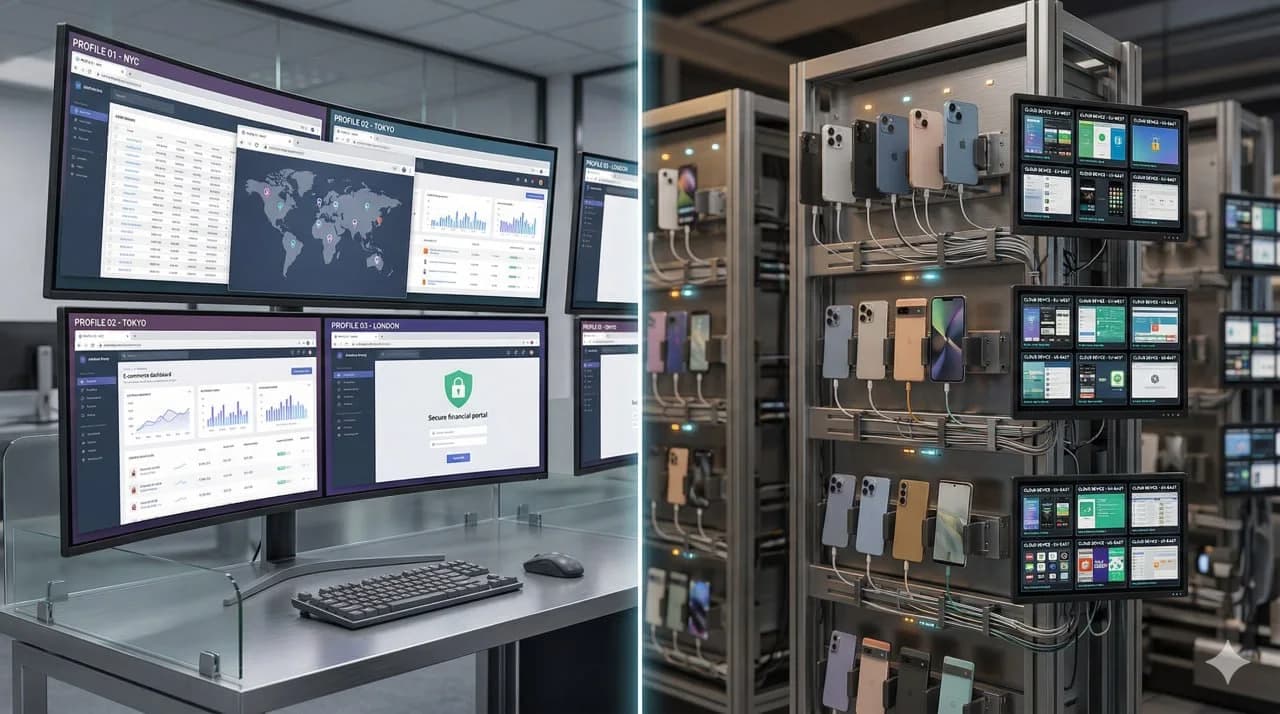
Short answer: An antidetect browser belongs to operations that live mainly inside desktop web sessions and need browser fingerprint separation. A cloud phone belongs to workflows that depend on native mobile apps, device-level identity, or a mobile operating environment that goes beyond browser tabs. The useful reading depends less on brand and more on whether the trust problem sits at the browser layer or the device layer.
Key takeaway: An antidetect browser isolates browser profiles. A cloud phone provides mobile operating environments. In mobile-first workflows, a browser-profile stack no longer covers the full operating environment.
These categories diverge most clearly when the workflow shifts into TikTok, Instagram, Facebook, WhatsApp, marketplace apps, or other mobile-first account operations.
That is why this comparison matters. Cloud phone vs antidetect browser is not a small feature debate. It documents which technical layer the workload sits on. The cloud-phone operating-model and cost comparison documents the cost-and-ownership dimension.
What Is a Cloud Phone? provides the category foundation for this comparison. Real Devices vs Emulators explains the hardware-trust contrast that sits underneath it.
Android Cloud Phone vs Real iPhone covers the mobile-infrastructure branch of that split.
Phone Farm vs Cloud Phone documents the ownership and operating-cost tradeoff, while How to Build an iPhone Farm covers the DIY build-out path.
Decision snapshot: browser layer or phone layer first?
A browser profile protects the web session. A cloud phone protects the mobile-app environment. The wrong order creates false confidence: a clean browser profile does not make Instagram, TikTok, WhatsApp or marketplace apps behave like they are running on a stable phone.
Use this split before buying:
- Browser-first: web dashboards, browser-only ad accounts, scraping consoles and cases where mobile app behavior is secondary.
- Phone-first: mobile-native login flows, camera or gallery workflows, app notifications, SIM/network continuity, account recovery and any process where the platform reads device behavior over time.
- Both layers: teams that run web tooling for operations but still need a real mobile endpoint for account creation, recovery, warming or app-native checks.
Not a fit: if no part of the workflow touches native mobile apps, a cloud phone can be unnecessary overhead. If the workflow depends on mobile trust, treating the phone as an afterthought is the bigger risk.
That is why this comparison should route into a buyer shortlist, not stop at definitions. For provider-level evaluation, continue with best cloud phones for social media.
What an antidetect browser actually does
An antidetect browser creates isolated browser environments so websites see different browser fingerprints, storage states, cookies, sessions, and profile-level settings.
That is useful when your workflow is mainly web-based, such as:
- ad account operations in desktop browsers,
- affiliate work,
- e-commerce back-office tasks,
- browser-based account separation,
- QA or scraping with controlled browser identity.
The core value is profile isolation at the browser layer.
That means antidetect browsers are strong when the site or platform interaction happens primarily through the web interface. In that context, the browser is the operating surface that matters most.
What a cloud phone actually does
A cloud phone gives you remote access to a phone-like operating environment. Depending on the provider, that may mean:
- an Android emulator,
- an ARM virtual device,
- a remotely hosted physical device,
- or a more managed mobile session environment.
Its value is not just that it looks like a phone. Its value is that the workflow can happen inside a mobile operating context, including native mobile apps.
That matters when your team needs:
- app-first operations rather than browser-only flows,
- mobile testing,
- social-media account work inside apps,
- device-level session separation,
- or a scalable mobile operating layer without building your own phone rack.
What Is a Cloud Phone? provides the architecture breakdown.
The real difference: browser-level isolation vs device-level environment
This comparison identifies which technical layer should be evaluated first.
An antidetect browser changes what the browser looks like.
A cloud phone changes the operating environment in which the work happens.
That distinction matters because native mobile apps can evaluate far more than a browser fingerprint. They can assess combinations of:
- device identity,
- OS consistency,
- app context,
- network quality,
- sensor realism,
- carrier conditions,
- and long-term behavior patterns.
That is why teams that begin with browser tools often later evaluate cloud-phone solutions as the workflow moves deeper into app-native operations. The original tool did not fail at its own job; it addressed a different layer.
Documentary fit for antidetect-browser workflows
The antidetect-browser side of the comparison covers cases where:
- the workflow is browser-first,
- the target platform works well on desktop web,
- the real problem is cookie and browser-fingerprint separation,
- your team needs many web profiles but not native mobile app execution,
- lower-cost desktop operations are enough.
In those cases, a cloud phone can be unnecessary overhead.
Documentary fit for cloud-phone workflows
The cloud-phone side of the comparison covers cases where:
- the workflow depends on native mobile apps,
- the web version is weaker or incomplete,
- the platform trust model is clearly mobile-first,
- the workflow requires mobile device separation rather than browser-profile separation,
- operators need app-native behaviors and workflows.
This is why cloud phones become relevant for mobile growth teams, app-centric operators, and agencies working where the browser is no longer the main operating surface. Android Cloud Phone vs Real iPhone documents the strongest architecture contrast for those mobile-first environments.
Best Cloud Phones for Social Media in 2026 surveys the ranked buyer landscape.
GeeLark alternative to Android cloud phones documents the Android-cloud-phone vendor comparison and the surrounding workload context.
Best Antidetect Tools for Social Media in 2026 documents the browser-first tool category for desktop-stack operations.
Comparison table: cloud phone vs antidetect browser
| Dimension | Antidetect browser | Cloud phone |
|---|---|---|
| Core layer solved | Browser identity and session isolation | Mobile operating environment |
| Best for | Desktop web workflows | Mobile-app workflows |
| Runs native mobile apps | No | Yes |
| Browser fingerprint control | Strong | Not the main job |
| Device-level environment | Weak | Stronger than browser-only tools |
| Typical operating surface | Chrome-based browser profiles | Android/iOS-style remote sessions, depending on architecture |
| Best fit profile | Browser-based operators, affiliate teams, media-buying teams | Mobile-first operators, social-media teams, app-based workflows |
| Main limitation | Stops at the browser layer | Quality depends on architecture: emulator, virtual device, or real hardware |
Workload split
An antidetect browser maps to workflows where
- accounts are managed mainly via desktop browser interfaces,
- native mobile app execution is not required,
- browser profile isolation is the main concern, and
- speed and cost matter more than a mobile operating layer.
A cloud phone maps to workflows where
- the operation is mobile-first,
- the team spends most of its time inside apps,
- platform behavior differs materially between web and mobile, and
- stronger separation is needed at the device level.
Mixed workflows need explicit layer boundaries
Some teams need both.
A browser stack can still make sense for:
- desktop ad managers,
- onboarding flows,
- browser support tasks,
- web-only back-office operations.
A cloud-phone stack can make sense for:
- account warm-up in apps,
- app-native posting or engagement workflows,
- platform-specific mobile actions,
- device-mapped operations.
In mixed environments, the mistake is assuming one category can do all jobs well.
Why the two categories are often confused
They are often discussed like brand alternatives, but they solve different layers.
This is more like comparing:
- a desktop browser-isolation tool,
- with a remote mobile infrastructure category.
That is why feature checklists alone mislead teams. A tool can look polished and still be structurally wrong for the workflow.
Best Antidetect Tools for Social Media in 2026 is the browser-first comparison that supports this architecture split.
AdsPower vs GoLogin vs Dolphin Anty is the direct browser-tool showdown.
VMOSCloud Alternative and DuoPlus Alternative cover adjacent Android-cloud-phone vendor comparisons.
Multilogin Alternative for Mobile documents how Multilogin-based teams handle the move into mobile-device workflows.
Practical buyer summary
Operations that live in browser tabs stay in the browser-profile-tooling category for desktop work.
Operations that live in native apps move out of antidetect-browser-only comparisons and into cloud-phone architecture comparisons:
- emulator-based,
- ARM virtual-device-based,
- or real-device-based.
Android Cloud Phone vs Real iPhone documents the direct architecture contrast for clearly mobile execution environments.
Device Fingerprinting on Mobile is the reference for pressure-testing platform signals. The phone-farm cost and ownership comparison documents the ownership split.
GeeLark alternative to Android cloud phones documents the Android-cloud-phone vendor layer. Android Cloud Phone vs Real iPhone documents the direct platform contrast.
Verdict
Use an antidetect browser for browser-first account work. Use a cloud phone for mobile-first app operations.
If the main trust problem is browser fingerprinting, an antidetect browser is usually enough. If the main trust problem is mobile environment credibility, app execution, and device-level separation, a cloud phone is the more relevant category.
Frequently asked questions
Which option is safer for long-running accounts?
The safer option is usually the one with the most coherent device story: real hardware, stable network identity, predictable operator behavior and fewer synthetic signals.
Is the cheaper setup always worse?
Not always. Cheaper setups can be fine for testing or low-stakes workflows. They become expensive when bans, manual recovery, account replacement and team time start costing more than the infrastructure itself.
What should agencies compare first?
Agencies should compare operational risk before feature lists: account value, recovery time, access control, device ownership, proxy routing and how easily a client workflow can be repeated.
Can mixed infrastructure work?
Yes, if roles are separated. Use lighter environments for QA or low-risk tasks and reserve real-device infrastructure for workflows where trust, mobile apps or iOS behavior are critical.
Stop juggling physical devices.
iRemotech gives you real iPhones in the cloud — ready for multi-account operations, automation, and scale. Create your account in minutes.
Sign up freeMiguel Nogales
Founder @ iRemotech
From Spain, living in Andorra. Tech enthusiast passionate about infrastructure, remote technology, and building innovative solutions.