Android Cloud Phone vs Real iPhone: The Technical Truth
Compare Android cloud phones vs real iPhones by architecture, device behavior, SIM identity, and operational fit for professional mobile workflows.
Android Cloud Phone vs Real iPhone: The Technical Truth
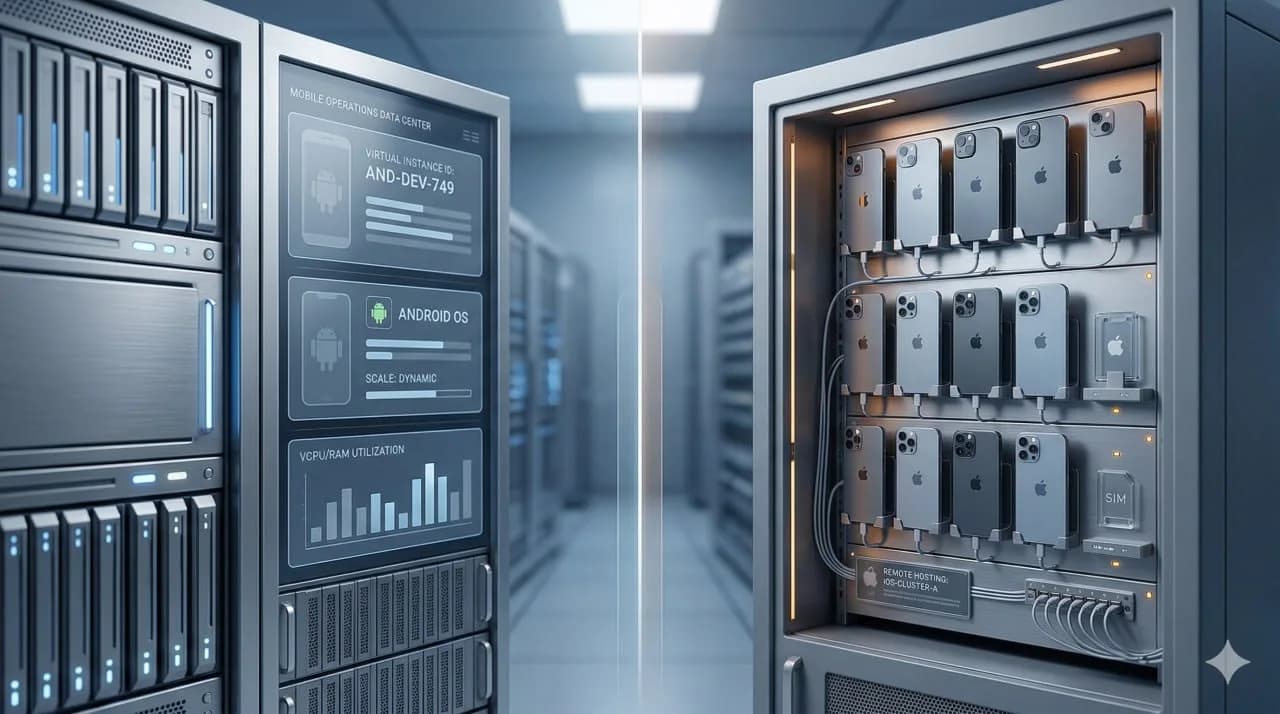
Short answer: An Android cloud phone and a real iPhone solve different problems. An Android cloud phone usually gives you a virtualized Android environment in a datacenter. A real iPhone setup gives you physical iOS hardware with real device behavior and, in iRemotech’s model, a dedicated SIM. Operations that depend on genuine iPhone behavior, carrier-backed identity, and long-term consistency belong to the real-iPhone category. Low-risk workflows that only need cheap Android sessions for testing or lighter execution remain inside the Android cloud-phone category.
Key takeaway: The real decision is not Android vs iPhone as a brand preference. It is virtual Android infrastructure vs physical iPhone infrastructure. That architectural difference affects device identity, app behavior, operational burden, and how well the setup holds up under professional multi-account work.
The phrase android cloud phone vs real iphone sounds like a simple platform comparison, but it is really an infrastructure comparison. Many so-called cloud phones are Android environments running in virtualized or ARM-based infrastructure. A real iPhone setup is an actual physical iPhone hosted remotely. Those are not interchangeable categories.
Broader category grounding sits in what a cloud phone actually is .
The detection layer behind this comparison is covered in Device Fingerprinting on Mobile .
Decision snapshot: Android convenience or iPhone trust?
The Android-cloud-phone category is attractive because it is fast to provision and usually easier to price. That does not make it equivalent to a remotely operated iPhone. The buying decision should separate convenience from the trust signal the account actually needs.
Use Android cloud phones when the workload is Android-first, the account value is low or medium, the team needs many short-lived environments and platform trust is not built around iOS behavior. Use real iPhones when the workflow depends on iOS audiences, Apple-device expectations, camera or gallery behavior, account recovery, long-lived sessions or a stricter mobile identity trail.
The edge case is where many teams make the wrong decision: they test on Android because it is easier, then discover that the live accounts behave differently on iOS or need a more credible device history. At that point the real cost is not only the subscription; it is the time lost rebuilding accounts, sessions, operators and recovery process.
For iRemotech, the value is the managed real-iPhone layer: physical devices, remote operation and less local hardware burden. If you are building a provider shortlist rather than a pure technical comparison, connect this choice with best cloud phones for social media so the commercial evaluation does not flatten Android virtual devices and physical iPhones into the same bucket. That separation matters for procurement too: two providers can both call themselves cloud-phone platforms while solving different identity, recovery and operator-access problems for very different teams and account-risk profiles over time. It also keeps renewal ownership explicit.
What an Android cloud phone actually is
An Android cloud phone is usually a remotely accessible Android environment hosted in a datacenter. In practice, that can mean one of three things:
- An emulator-based Android instance.
- An ARM virtual device running Android.
- A remotely hosted Android phone marketed as a cloud phone.
That distinction matters because the term cloud phone gets used very loosely. Two products can both call themselves cloud phones while giving you completely different device signals, app behavior, and scaling characteristics.
Android cloud phones usually attract teams because they are:
- cheaper to start with,
- easy to provision in volume,
- available on demand,
- common in Android-only workflows, and
- convenient for lightweight testing or automation.
The limit is that many Android cloud phone environments are still synthetic or partially synthetic. Even when they perform well, they may not reproduce the same device-level conditions as a physical iPhone. That matters when an operation depends on genuine hardware behavior instead of a close approximation.
What a real iPhone setup actually is
A real iPhone setup is exactly what it sounds like: a physical iPhone hosted remotely and accessed through the internet. In iRemotech’s model, each device is a real iPhone with its own dedicated SIM, managed inside remote infrastructure rather than inside a local DIY rack.
That changes the operating conditions in several important ways:
- the hardware is real,
- the OS environment is real iOS,
- app behavior is native to the device,
- the carrier layer is backed by a real SIM, and
- the access model is remote instead of local-only.
This is why a real iPhone setup should not be treated as just another cloud phone flavor. It is a different architecture class. If you are comparing simulated Android infrastructure to physical iPhone infrastructure, you are not comparing two versions of the same thing. You are comparing two fundamentally different operating environments.
Real devices vs emulators provides the broader comparison between synthetic and physical environments.
The key architectural differences
The biggest gap between an Android cloud phone and a real iPhone is not UI. It is the stack underneath the UI.
1. Hardware layer
An Android cloud phone often relies on virtualization, emulation, or standardized hosted Android infrastructure. A real iPhone uses Apple hardware.
That matters because real hardware creates real device behavior. Simulated environments can get close, but they still have to reproduce what physical hardware does naturally.
2. Operating system layer
Android cloud phone providers usually give you Android. A real iPhone gives you iOS.
When a workflow depends on how an app behaves on iPhone, Android is not a substitute. This is especially important when teams try to use Android cloud tools as a shortcut for operations that ultimately need real iOS execution.
3. Device identity layer
A virtual Android setup may expose a usable device environment, but it still has to construct or standardize many signals. A real iPhone begins with a physical device identity.
That does not mean any real iPhone is automatically safe or perfect. It means the starting point is materially different.
4. Network and carrier layer
Many cloud phone products focus on remote access first and leave network identity as a separate problem. iRemotech’s real iPhones include dedicated SIMs, which means device identity and carrier identity are aligned more closely with genuine mobile use.
That is one reason why teams comparing architectures should not reduce the decision to monthly price alone.
5. Operational model
Android cloud phones usually win on instant provisioning and lower entry cost. Real iPhone infrastructure wins when the operation specifically needs real iOS behavior and lower reliance on synthetic environments.
The local-build versus managed-hosted model is detailed in box phone farm vs remote iPhone farm .
Android cloud phone vs real iPhone comparison table
If DuoPlus is on the shortlist for Android cloud capacity, the DuoPlus alternative shows where physical iPhones become the safer option.
| Dimension | Android cloud phone | Real iPhone |
|---|---|---|
| Core architecture | Usually virtualized Android, emulator-based, ARM-based, or hosted Android infrastructure | Physical iPhone hardware hosted remotely |
| OS | Android | iOS |
| Device behavior | Depends on provider architecture and how synthetic the environment is | Native iPhone behavior on real hardware |
| Carrier identity | Often handled separately from the device environment | Can include a dedicated SIM tied to the device |
| Fit for real iOS workflows | Weak to nonexistent | Strong |
| Provisioning speed | Usually fast | Slower than spinning up virtual Android, but closer to final operating conditions |
| Entry cost | Usually lower | Usually higher per device |
| Operational realism | Varies widely by provider | High, because the hardware is real |
| Best use cases | Android testing, lightweight automation, low-cost session access | iOS-specific operations, professional mobile workflows, higher-trust setups |
| Main tradeoff | Cheap and flexible, but often more synthetic | More expensive, but structurally closer to genuine device conditions |
Why this difference matters in real operations
At small scale, many setups appear to work. At professional scale, the hidden constraints become visible.
A virtual Android environment can look attractive because it is:
- cheaper to deploy,
- easier to spin up,
- easier to replace quickly, and
- widely available from multiple vendors.
But operators do not get paid for low setup cost alone. They get paid for stable execution. If the workflow depends on real iOS, long-term consistency, or a device environment that does not need heavy interpretation, the cheaper architecture can become a false economy.
This is the same pattern seen in larger infrastructure decisions. A setup that looks cheap in month one may become expensive once maintenance, failure recovery, device quality, and operational work are included. The operating-cost split between local farms and cloud delivery lays out that cost model.
The phone farm guide defines the broader operating model.
How to Manage Multiple Instagram Accounts Professionally covers the day-to-day Instagram execution layer.
Best Cloud Phones for Social Media in 2026 remains the wider Android-provider scan.
Scenarios where Android cloud phones are often sufficient
Android cloud phones are commonly used when:
- the workload only needs Android,
- low-cost session volume matters,
- the task is testing rather than higher-value account operations,
- iOS behavior is not required,
- speed and price matter more than device realism, or
- a team wants to validate a workflow before moving to higher-trust infrastructure.
That explains why Android cloud phones remain common. They solve a real infrastructure need. The main analytical mistake is treating them as direct replacements for real iPhones in workflows that are actually iPhone-dependent.
Scenarios where a real iPhone setup is often required
Real iPhone setups tend to matter more when:
- the workflow needs real iOS execution,
- app behavior on iPhone matters,
- the operation needs physical-device conditions instead of virtual approximation,
- device identity and carrier identity need to stay closer together,
- the team is handling serious multi-account or agency work, or
- the cost of environment weakness is higher than the cost of the device.
This is one reason teams move toward real-device infrastructure. The point is not prestige; it is that the architecture starts closer to the environment the platforms actually evaluate.
Matching the architecture to the workload
The browser-profiles-versus-mobile-infrastructure comparison covers the browser-profile alternative.
Phone farm software: what actually controls the devices explains the day-to-day execution layer for real device fleets.
When the browser-tool category is still relevant, the adjacent reference set includes:
- Best Antidetect Tools for Social Media in 2026
- AdsPower vs GoLogin vs Dolphin Anty
- GoLogin vs Multilogin vs AdsPower
- Multilogin Alternative for Mobile
GeeLark alternative to Android cloud phones stays on the Android-provider evaluation side.
The Android-cloud-phone versus real-device comparison serves as the vendor-level real-device check.
Device Fingerprinting on Mobile is the dedicated platform-risk follow-up.
iPhone Farm for Agencies covers the agency-delivery angle.
The workload-specific live lanes are:
- Phone Farm for TikTok
- Phone Farm for Instagram
- Cloud Phone for WhatsApp Business
- How to Manage Multiple Instagram Accounts Professionally
Android cloud phones are commonly used for:
- cheap Android capacity,
- fast deployment,
- lightweight app testing,
- basic automation, or
- lower-risk workflows where Android is enough.
Real iPhone setups are commonly used for:
- actual iOS devices,
- physical hardware behavior,
- dedicated SIM-backed setups,
- remote access without building a local rack, or
- infrastructure that stays closer to professional mobile operating conditions.
How to build an iPhone farm covers the managed-real-iPhones-versus-local-farm comparison.
iPhone Farm for Agencies focuses on the agency-delivery context.
Phone Farm for TikTok covers TikTok execution.
Phone Farm for Instagram covers Instagram-led workflows.
How to Manage Multiple Instagram Accounts Professionally covers Instagram operator-process design.
Verdict
Android cloud phones and real iPhones solve different infrastructure problems, so the right fit depends on whether the workflow can tolerate a synthetic Android environment or requires real iOS conditions.
Android cloud phones remain useful when low-cost Android capacity is enough. Real iPhone infrastructure becomes more relevant when the workflow depends on physical-device behavior, real iOS execution, and a hardware-backed starting point instead of simulation.
That is the technical truth behind this comparison: the decision is less about interface similarity and more about how much synthetic infrastructure the operation can tolerate.
Frequently asked questions
Which option is safer for long-running accounts?
The safer option is usually the one with the most coherent device story: real hardware, stable network identity, predictable operator behavior and fewer synthetic signals.
Is the cheaper setup always worse?
Not always. Cheaper setups can be fine for testing or low-stakes workflows. They become expensive when bans, manual recovery, account replacement and team time start costing more than the infrastructure itself.
What should agencies compare first?
Agencies should compare operational risk before feature lists: account value, recovery time, access control, device ownership, proxy routing and how easily a client workflow can be repeated.
Can mixed infrastructure work?
Yes, if roles are separated. Use lighter environments for QA or low-risk tasks and reserve real-device infrastructure for workflows where trust, mobile apps or iOS behavior are critical.
Stop juggling physical devices.
iRemotech gives you real iPhones in the cloud — ready for multi-account operations, automation, and scale. Create your account in minutes.
Sign up freeMiguel Nogales
Founder @ iRemotech
From Spain, living in Andorra. Tech enthusiast passionate about infrastructure, remote technology, and building innovative solutions.